你是否曾经有过一个很棒的应用想法,却没有工具来构建它呢? 借助 AI,现在你只需使用自然语言,就能在几分钟内将自己的应用想法变为现实。 在本文中,我们将用于 GitHub Spark 生成、改进和共享单词搜索应用,而无需自行编写一行代码。
注意
GitHub Spark 位于 使用数据保护的公共预览版 中,可能会更改。
创建应用的原型
让我们先创建一个应用的初始基础版本,后续再在此基础上继续开发。
-
发送以下提示,为你的应用生成第一个迭代版本:
Copilot prompt Please create a word search game. The game should take in a set of words from the user, then create a word search puzzle containing those words, as well as a word bank listing the words. Words in the puzzle can be horizontal, vertical, diagonal, forwards, and backwards, and are "found" when the user clicks and drags their mouse across them. Once all words are found, give the user the option to create a new puzzle.
Please create a word search game. The game should take in a set of words from the user, then create a word search puzzle containing those words, as well as a word bank listing the words. Words in the puzzle can be horizontal, vertical, diagonal, forwards, and backwards, and are "found" when the user clicks and drags their mouse across them. Once all words are found, give the user the option to create a new puzzle. -
观看 Spark 实时构建你的应用! 当预览界面出现时,就说明应用生成完成了。
-
要测试你的应用,请使用预览功能创建并解决一个谜题。
改进应用
就像这样,我们的应用已经可以运行了! 但它仍需要进行一些调整。 让我们给 Spark 补充一些额外的提示词,来打磨我们的项目。
-
在页面左侧的“Iterate”选项卡中,发送以下提示****:
Copilot prompt Please add a leaderboard and a timer to the game. The timer should start when the user generates a new puzzle, then stop when all words are found. The user should then be able to enter their name, and their name, time, and the number of words in their puzzle should be displayed on the leaderboard. The leaderboard should be sortable in ascending and descending order by each of the three categories.
Please add a leaderboard and a timer to the game. The timer should start when the user generates a new puzzle, then stop when all words are found. The user should then be able to enter their name, and their name, time, and the number of words in their puzzle should be displayed on the leaderboard. The leaderboard should be sortable in ascending and descending order by each of the three categories. -
更新应用后,创建并解决另一个谜题,以查看正在运行的新功能。
-
发挥创意,自行改进这个应用吧! 如果你一时没有头绪,请选择 Spark 在提示词文本框上方提供的一条建议。 你也可以通过“Theme”、“Data”和“Prompts”这几个选项卡中的可视化编辑控件进行修改,完全无需接触代码。
调试你的应用
在构建应用的过程中,你可能会遇到一些错误。 通常,Spark会识别这些问题,并在提示文本框上方的“错误”弹出窗口中列出它们。 要修复这些错误,请单击“Fix all”****。

如果你发现了一个连 Spark 本身都没有标记出的错误,请编写一个提示来修复它。 为获得最佳结果,请提供错误的详细描述以及理想的修复状态。 例如,如果你发现添加超过某个字符数的词语会导致谜题显示异常,可以发送以下提示:
Please prevent users from entering words longer than the number of rows or columns in the puzzle. Additionally, add an option to change the size of a puzzle. If the user tries to enter a word that's longer than the current size of the puzzle, display an error message telling them that provided words must be less than or equal to the size of the puzzle.
Please prevent users from entering words longer than the number of rows or columns in the puzzle. Additionally, add an option to change the size of a puzzle. If the user tries to enter a word that's longer than the current size of the puzzle, display an error message telling them that provided words must be less than or equal to the size of the puzzle.
共享应用
现在,你对你的应用感到满意,让我们发布它,以便你可以与他人共享它。 你也可以选择将 Spark 设置为只读模式共享,这样其他用户可以查看你应用中的内容,但无法编辑内容、删除文件或记录,也不能创建新项****。
注意
- 如果使 Spark 可供所有用户 GitHub 访问,则所有用户都可以访问和编辑存储在 Spark 中的数据。 在使其他用户能够访问应用之前,请确保删除应用中的任何私密或敏感数据。 此选项不适用于 托管用户帐户
-
在页面右上角,单击“Publish”****。
-
默认情况下,你的 Spark 将发布为专用,并且仅可供你访问。 若要让其他用户GitHub访问你的应用,请在“发布”下拉列表的 “可见性”部分中,选择 “组织”,使你的 Spark 可供所选组织或所有用户GitHub 访问。 这样,任何拥有 GitHub 帐户的人都可以访问 Spark。
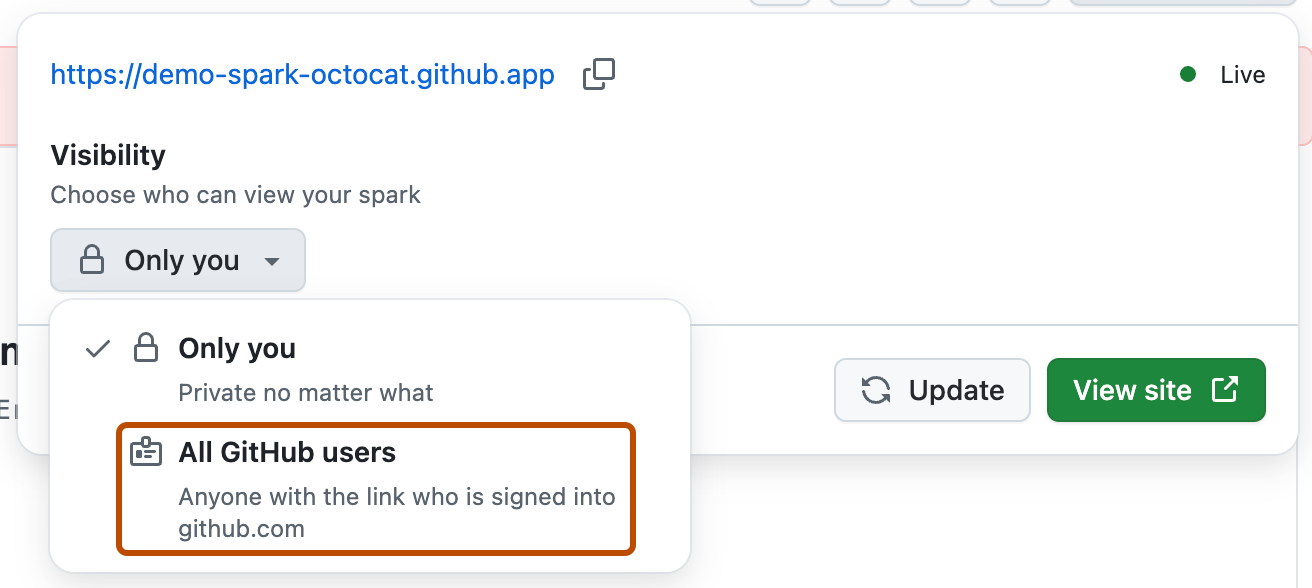
-
如果使 Spark 对其他用户可见(即除专用设置之外的任何设置),则发布下拉列表中会显示“数据访问”选项。 这样,你可以选择控制谁有权编辑 Spark 中的内容和数据。
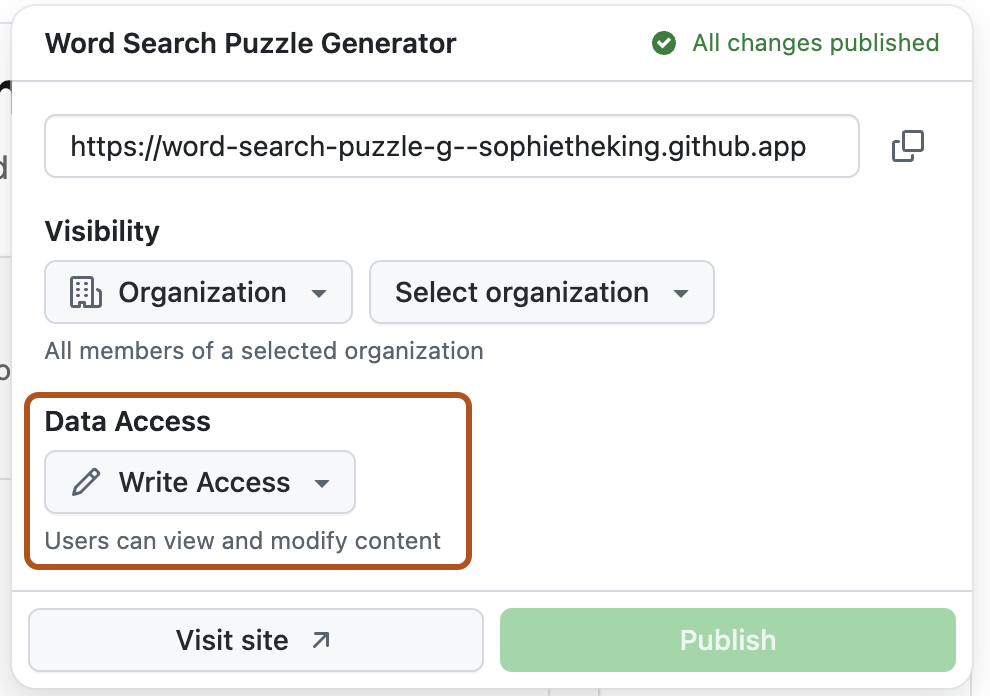
选择 “只读”,让其他人查看你的应用,而无需允许他们创建、编辑或删除内容或数据。 选择 “写入访问权限 ”以允许用户在 Spark 中编辑和查看内容和数据。
例如,如果已创建家庭日历应用并想要展示应用,但不希望用户能够在日历中创建、编辑或删除事件,请选择“只读”。
-
单击 “查看网站 ”以查看已部署的应用,然后复制并共享应用的 URL。


后续步骤
我们刚刚创建了一个词搜索应用,但 Spark 可以制作各种 Web 应用! 试着自己创建一个新应用吧。 如果你需要一些灵感,以下是几个入门的创意点子:
- 试着构建一个新闻聚合应用或一个智能食谱生成器********。
- 构建一个预算追踪器,以便设定预算、录入支出清单,并显示剩余预算总额****。 你可以为每笔支出添加类别和日期,然后按不同类别对支出进行排序。