メモ
この記事は、パブリック リポジトリの所有者としてのリポジトリ レベルのアドバイザリの編集に適用されます。
リポジトリの所有者ではないユーザーは、github.com/advisories にある GitHub Advisory Database のグローバル セキュリティ アドバイザリに貢献できます。 グローバル アドバイザリを編集しても、リポジトリでのアドバイザリの表示方法が変更されたり、影響を受けたりすることはありません。 詳しくは、「Editing security advisories in the GitHub Advisory Database」をご覧ください。
Adding a collaborator to a security advisory
Collaborators have write permissions to the security advisory. For more information, see リポジトリ セキュリティ アドバイザリの権限レベル.
メモ
リポジトリまたは組織からユーザーを削除するとき、そのユーザーがセキュリティ アドバイザリのコラボレーターでもある場合、GitHub は、セキュリティ アドバイザリのコラボレーターとしてのユーザーを自動的に削除します。 これにより、元コラボレーターからの不正アクセスが防止されます。 For more information about removing a collaborator on a security advisory, see Removing a collaborator from a repository security advisory.
- GitHub で、リポジトリのメイン ページに移動します。
- リポジトリ名の下にある [Security] をクリックします。 [Security] タブが表示されない場合は、 ドロップダウン メニューを選んでから、[Security] をクリックします。
![タブを示すリポジトリ ヘッダーのスクリーンショット。 [セキュリティ] タブが濃いオレンジ色の枠線で強調表示されています。](/assets/cb-17801/images/help/repository/security-tab.png)
- 左側のサイドバーの [Reporting] で、 [Advisories] をクリックします。
- In the "Security Advisories" list, click the security advisory you'd like to add a collaborator to.
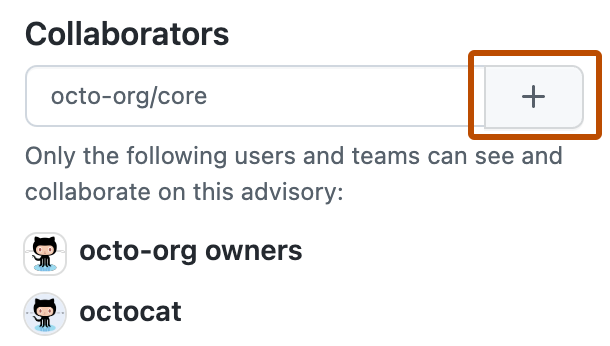
- On the right side of the page, under "Collaborators", type the name of the user or team you'd like to add to the security advisory.
- Click to add the selected user or team as a collaborator.
![タブを示すリポジトリ ヘッダーのスクリーンショット。 [セキュリティ] タブが濃いオレンジ色の枠線で強調表示されています。](/assets/cb-17801/mw-1440/images/help/repository/security-tab.webp)
