Anyone with read permission for a repository can see code scanning annotations on pull requests. For more information, see Triaging code scanning alerts in pull requests.
Viewing the alerts for a repository
You need write permission to view a summary of all the alerts for a repository on the Security tab.
By default, the code scanning alerts page is filtered to show alerts for the default branch of the repository only.
-
Em GitHub, acesse a página principal do repositório.
-
Abaixo do nome do repositório, clique em Security. Caso não consiga ver a guia "Security", selecione o menu suspenso e clique em Security.

-
Na barra lateral esquerda, clique em Code scanning.
-
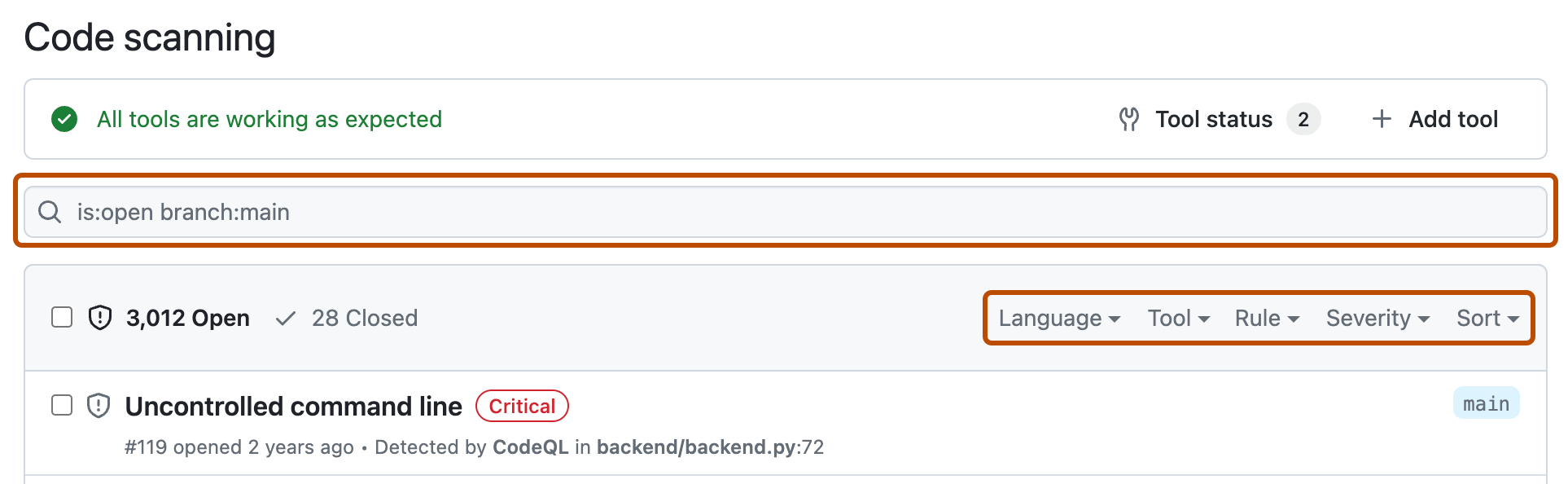
Optionally, use the free text search box or the dropdown menus to filter alerts. For example, you can filter by the tool that was used to identify alerts.
-
Em "Code scanning", clique no alerta que deseja explorar para ver a página do alerta detalhado. O status e os detalhes na página de alerta refletem apenas o estado do alerta no branch padrão do repositório, mesmo que o alerta exista em outros branches. Você pode ver o status do alerta em branches não padrão na seção Branches afetados no lado direito da página de alerta. Se um alerta não existir no branch padrão, o status do alerta será exibido como "na solicitação de pull" ou "no branch" e será cinza. A seção Development mostra branches vinculados e pull requests que corrigirão o alerta.
-
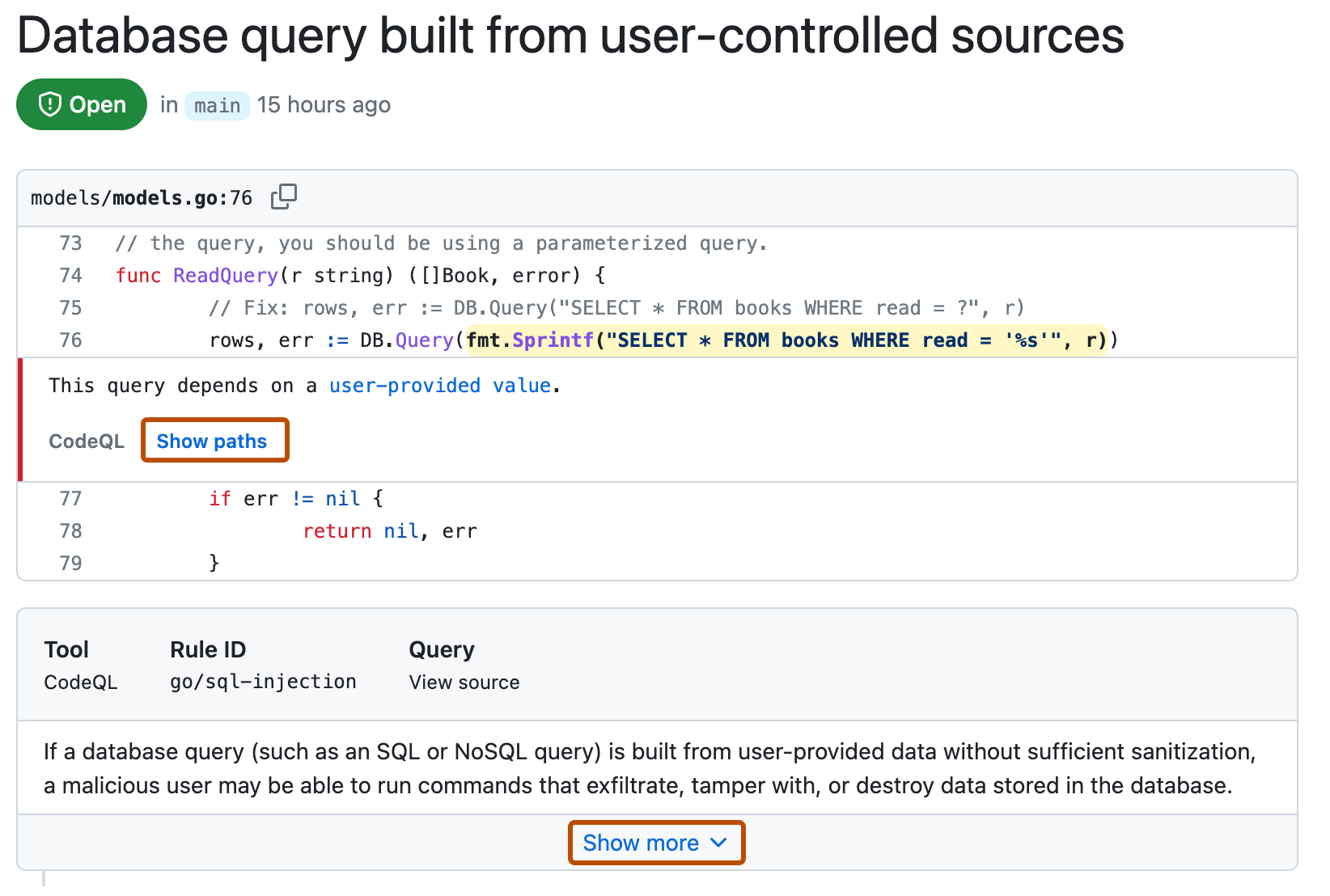
Optionally, if the alert highlights a problem with data flow, click Show paths to display the path from the data source to the sink where it's used.
-
Alerts from CodeQL analysis include a description of the problem. Click Show more for guidance on how to fix your code.
-
Opcionalmente, atribua o alerta para alguém corrigir usando o controle Assignees mostrado à direita, consulte Atribuindo alertas.


For more information, see Sobre alertas de digitalização de códigos.
Observação
You can see information about when code scanning analysis last ran on the tool status page. For more information, see Sobre a página de status da ferramenta para a verificação de código.
Viewing metrics for CodeQL pull request alerts for an organization
For code scanning alerts from CodeQL analysis, you can use security overview to see how CodeQL is performing in pull requests in repositories where you have write access across your organization, and to identify repositories where you may need to take action. For more information, see Viewing metrics for pull request alerts.
Filtering code scanning alerts
You can filter the alerts shown in the code scanning alerts view. This is useful if there are many alerts as you can focus on a particular type of alert. There are some predefined filters and a range of keywords that you can use to refine the list of alerts displayed.
When you select a keyword from either a drop-down list, or as you enter a keyword in the search field, only values with results are shown. This makes it easier to avoid setting filters that find no results.

If you enter multiple filters, the view will show alerts matching all these filters. For example, is:closed severity:high branch:main will only display closed high-severity alerts that are present on the main branch. The exception is filters relating to refs (ref, branch and pr): is:open branch:main branch:next will show you open alerts from both the main branch and the next branch.
Observe que, se você tiver filtrado os alertas em um branch não padrão, mas os mesmos alertas existirem no branch padrão, a página de qualquer alerta especificado ainda refletirá apenas o status do alerta no branch padrão, mesmo que esse status entre em conflito com o status em um branch não padrão. Por exemplo, um alerta exibido na lista "Abrir" no resumo dos alertas de branch-x pode mostrar o status "Corrigido" na página do alerta, caso o alerta já esteja corrigido no branch padrão. Veja o status do alerta para o branch na seção Branches afetados no lado direito da página de alerta.
You can prefix the tag filter with - to exclude results with that tag. For example, -tag:style only shows alerts that do not have the style tag.
Restricting results to application code only
You can use the "Only alerts in application code" filter or autofilter:true keyword and value to restrict results to alerts in application code. For more information about the types of code that are automatically labeled as not application code, see Sobre alertas de digitalização de códigos.
Searching code scanning alerts
You can search the list of alerts. This is useful if there is a large number of alerts in your repository, or if you don't know the exact name for an alert for example. GitHub performs the free text search across:
- The name of the alert
- The alert details (this also includes the information hidden from view by default in the Show more collapsible section)
| Supported search | Syntax example | Results |
|---|---|---|
| Single word search | injection | Returns all the alerts containing the word injection |
| Multiple word search | sql injection | Returns all the alerts containing sql or injection |
| Exact match search (use double quotes) | "sql injection" | Returns all the alerts containing the exact phrase sql injection |
| OR search | sql OR injection | Returns all the alerts containing sql or injection |
| AND search | sql AND injection | Returns all the alerts containing both words sql and injection |
Dica
- The multiple word search is equivalent to an OR search.
- The AND search will return results where the search terms are found anywhere, in any order in the alert name or details.
- Em GitHub, acesse a página principal do repositório.
- Abaixo do nome do repositório, clique em Security. Caso não consiga ver a guia "Security", selecione o menu suspenso e clique em Security.
- Na barra lateral esquerda, clique em Code scanning.
- To the right of the Filters drop-down menus, type the keywords to search for in the free text search box.
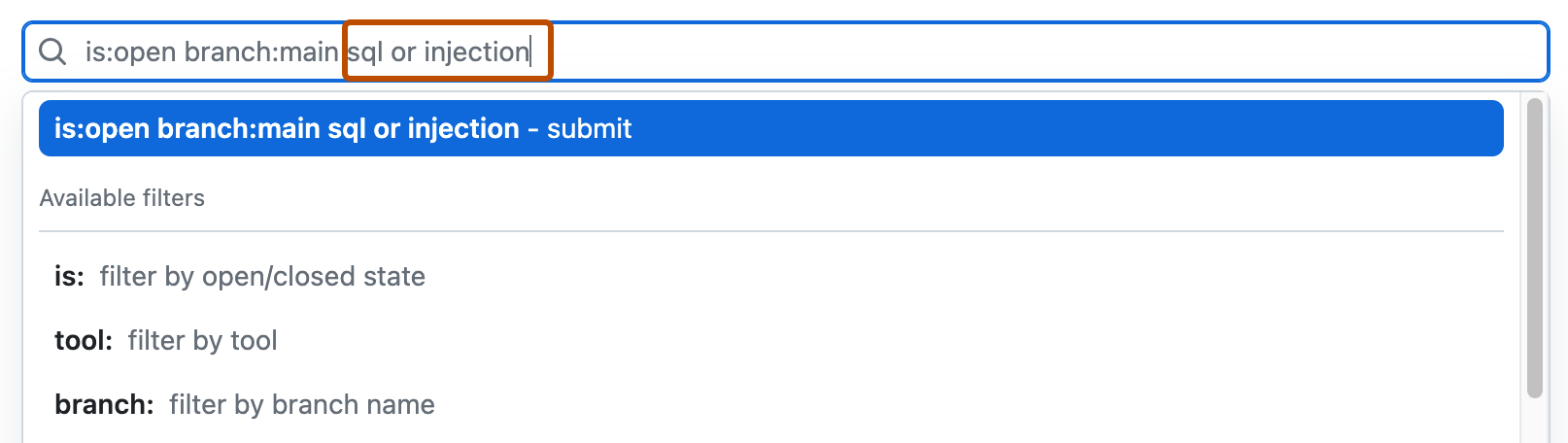
- Press return. The alert listing will contain the open code scanning alerts matching your search criteria.

Auditing responses to code scanning alerts
Você pode auditar as ações executadas em resposta aos alertas do code scanning usando as ferramentas do GitHub. Para saber mais, confira Alertas de segurança de auditoria.