About using rulesets for code scanning merge protection
참고 항목
- Merge protection with rulesets is not related to status checks. For more information about status checks, see 상태 검사 정보.
- Merge protection with rulesets will not apply to merge queue groups or Dependabot pull requests analyzed by default setup.
- All the lines of code identified by an alert must exist in the pull request diff. For more information, see 코드 검사에 대한 SARIF 지원.
You can use rulesets to prevent pull requests from being merged when one of the following conditions is met:
- 필수 도구가 규칙 집합에 정의된 심각도에 대한 code scanning 경고를 발견했습니다.
- 필수 code scanning 도구의 분석이 아직 진행 중입니다.
- 필수 code scanning 도구가 리포지토리에 대해 구성되지 않았습니다.
Typically you should use rulesets target long-lived feature branches, where you would like to guarantee that code has been analyzed before pull requests can be merged.
Configuring a code scanning rule will not automatically enable code scanning. For more information about how to enable code scanning, see Configuring default setup for code scanning.
For more information about code scanning alerts, see 코드 검사 경고 정보.
You can set merge protection with rulesets at the repository or organization levels, and for repositories configured with either default setup or advanced setup. You can also use the REST API to set merge protection with rulesets.
For more information about rulesets, see 규칙 세트 정보.
Creating a merge protection ruleset for a repository
-
GitHub에서 리포지토리의 기본 페이지로 이동합니다.
-
리포지토리 이름 아래에서 Settings를 클릭합니다. "설정" 탭이 표시되지 않으면 드롭다운 메뉴를 선택한 다음 설정을 클릭합니다.

-
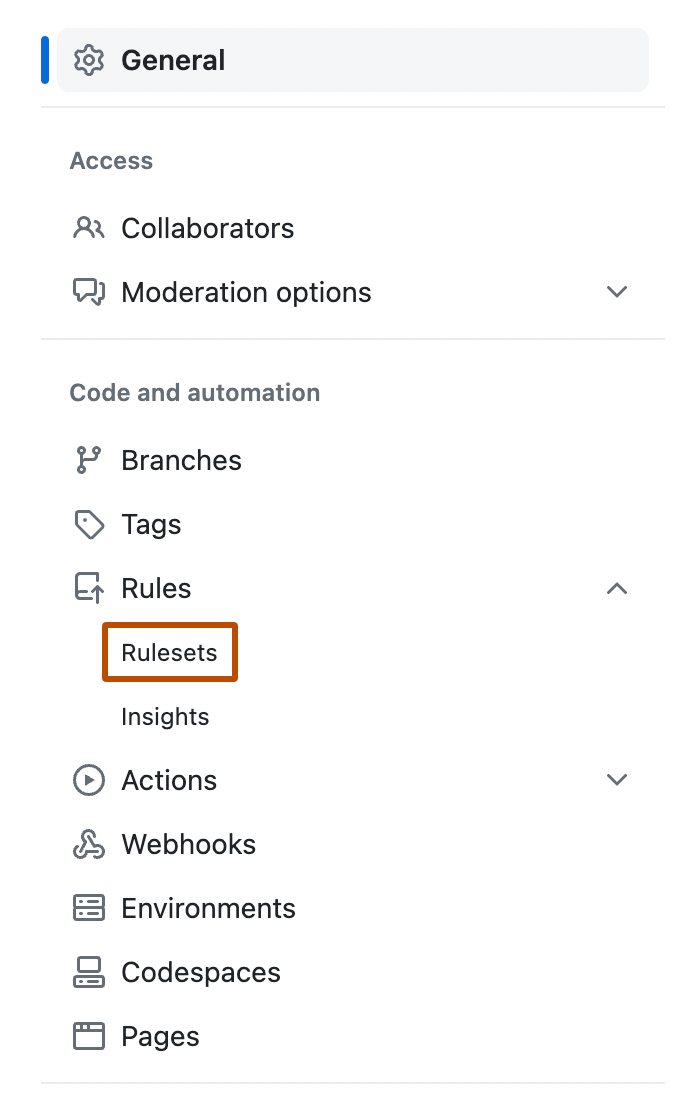
왼쪽 사이드바의 "코드 및 자동화"에서 규칙을 클릭한 다음 규칙 세트를 클릭합니다.
-
Click New ruleset.
-
To create a ruleset targeting branches, click New branch ruleset.
-
"규칙 집합 이름" 아래에 규칙 집합의 이름을 입력합니다.
-
필요에 따라 기본 적용 상태를 변경하려면 Disabled 를 클릭하고 적용 상태를 선택합니다.
-
"분기 보호"에서 code scanning 결과 필요를 선택합니다.
-
"Required tools and alert thresholds"에서 Add tool을 클릭하고 드롭다운에서 code scanning 도구를 선택합니다. 예를 들어 "CodeQL"을(를) 선택합니다.
-
code scanning 도구의 이름 옆에서:
- 경고를 클릭하고 없음, 오류, 오류 및 경고 또는 모두 중 하나를 선택합니다.
- 보안 경고를 클릭하고 없음, 위험, 높음 이상, 중간 이상 또는 모두 중 하나를 선택합니다.
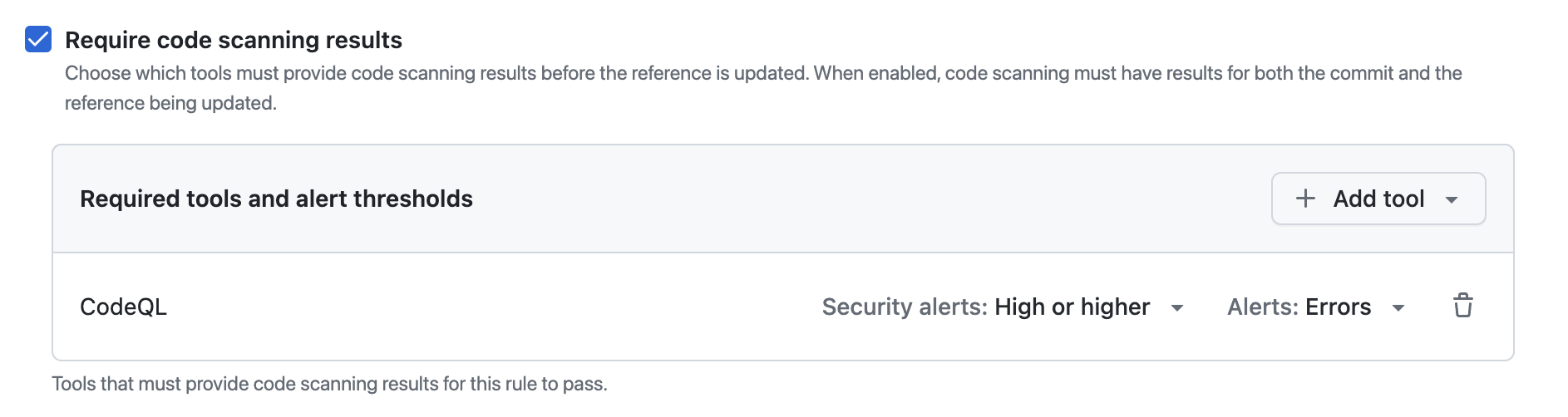


경고 심각도 및 보안 심각도 수준에 대한 자세한 내용은 코드 검사 경고 정보을(를) 참조하세요.
For more information about managing rulesets in a repository, see 리포지토리에 대한 규칙 세트 관리.
Creating a merge protection ruleset for all repositories in an organization
-
GitHub의 오른쪽 위 모서리에서 프로필 사진을 클릭한 다음, Your organizations를 클릭합니다.
-
조직 옆에 있는 설정을 클릭합니다.
-
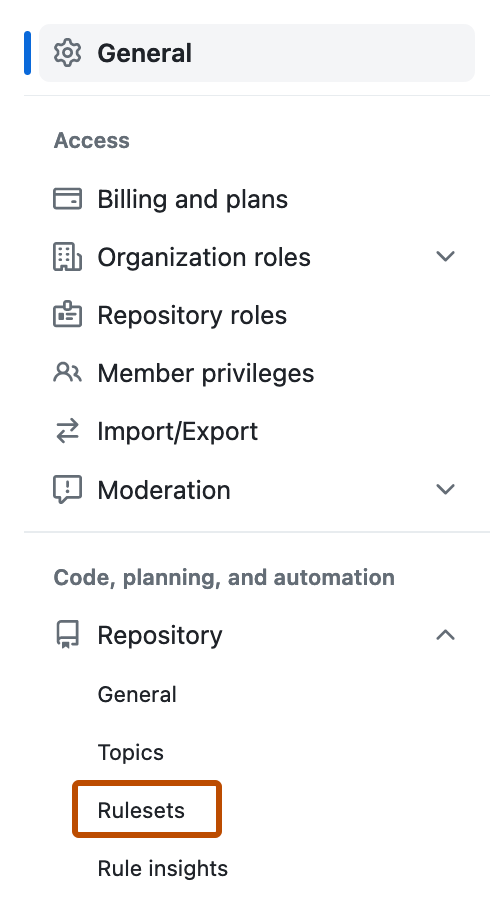
왼쪽 사이드바의 "Code, planning, and automation" 섹션에서 Repository를 클릭한 다음 Rulesets를 클릭합니다.
-
Click New ruleset.
-
To create a ruleset targeting branches, click New branch ruleset.
-
"규칙 집합 이름" 아래에 규칙 집합의 이름을 입력합니다.
-
필요에 따라 기본 적용 상태를 변경하려면 Disabled 를 클릭하고 적용 상태를 선택합니다.
-
"분기 보호"에서 code scanning 결과 필요를 선택합니다.
-
"Required tools and alert thresholds"에서 Add tool을 클릭하고 드롭다운에서 code scanning 도구를 선택합니다. 예를 들어 "CodeQL"을(를) 선택합니다.
-
code scanning 도구의 이름 옆에서:
- 경고를 클릭하고 없음, 오류, 오류 및 경고 또는 모두 중 하나를 선택합니다.
- 보안 경고를 클릭하고 없음, 위험, 높음 이상, 중간 이상 또는 모두 중 하나를 선택합니다.

경고 심각도 및 보안 심각도 수준에 대한 자세한 내용은 코드 검사 경고 정보을(를) 참조하세요.
For more information about managing rulesets for repositories in an organization, see 조직의 리포지토리에 대한 규칙 집합 관리.
Creating a merge protection ruleset with the REST API
You can use the REST API to create a ruleset with the code_scanning rule, which allows you to define specific tools and set alert thresholds. For more information, see 규칙에 대한 REST API 엔드포인트.