À propos de Dependabot
Ce guide de démarrage rapide vous guide tout au long de la configuration et de l’activation Dependabot, de l’affichage Dependabot alertset de la mise à jour de votre référentiel pour utiliser une version sécurisée de la dépendance.
Dependabot se compose de trois fonctionnalités différentes qui vous aident à gérer vos dépendances :
- Dependabot alerts : Vous informe des vulnérabilités dans les dépendances que vous utilisez dans votre référentiel.
- Dependabot security updates : Lancer automatiquement des demandes de mise à jour des dépendances que vous utilisez et qui présentent des vulnérabilités de sécurité connues.
- Dependabot version updates : Lancer automatiquement des demandes de tirage pour maintenir vos dépendances à jour.
Prerequisites
Dans le cadre de ce guide, nous allons utiliser un référentiel de démonstration pour illustrer la façon dont Dependabot détecte les vulnérabilités dans les dépendances, où vous pouvez voir Dependabot alerts sur GitHub, et comment vous pouvez explorer, corriger ou ignorer ces alertes.
Vous devez commencer par dupliquer (fork) le dépôt de démonstration.
- Accédez à l’adresse https://github.com/dependabot/demo.
- En haut de la page, sur la droite, cliquez sur Fourche.
- Sélectionnez un propriétaire (vous pouvez sélectionner votre GitHub compte personnel) et tapez un nom de référentiel. Pour plus d’informations sur la duplication des référentiels, consultez Dupliquer un référentiel.
- Cliquez sur Créer une duplication.
Activer Dependabot pour votre référentiel
Vous devez suivre les étapes ci-dessous sur le dépôt que vous avez forké dans Prérequis.
-
Sur GitHub, accédez à la page principale du référentiel.
-
Sous le nom de votre référentiel, cliquez sur Paramètres. Si vous ne voyez pas l’onglet « Paramètres », sélectionnez le menu déroulant , puis cliquez sur Paramètres.

-
Dans la section « Sécurité » de la barre latérale, cliquez sur Advanced Security.
-
Sous « »,Dependabot cliquez sur Activer pour Dependabot alerts, Dependabot security updateset Dependabot version updates.
-
Si vous avez cliqué sur Activer pour Dependabot version updates, vous pouvez modifier le fichier de configuration par défaut
dependabot.ymlqui GitHub vous crée dans le/.githubrépertoire de votre référentiel. Pour activer Dependabot version updates votre référentiel, vous configurez généralement ce fichier en fonction de vos besoins en modifiant le fichier par défaut et en validant vos modifications. Vous pouvez vous référer à l’extrait de code fourni dans Configuration de mises à jour de version Dependabot pour obtenir un exemple.

Remarque
Si le graphique de dépendance n’est pas déjà activé pour le référentiel, GitHub l’active automatiquement lorsque vous l’activez Dependabot.
Pour plus d’informations sur la configuration de chacune de ces Dependabot fonctionnalités, consultez AUTOTITLE, AUTOTITLE et Configuration des mises à jour de sécurité Dependabot.
Affichage Dependabot alerts de votre dépôt
Si Dependabot alerts sont activées pour un référentiel, vous pouvez afficher Dependabot alerts sur l’onglet Security and quality du référentiel. Vous pouvez utiliser le référentiel dupliqué sur lequel vous avez activé Dependabot alerts dans la section précédente.
-
Sur GitHub, accédez à la page principale du référentiel.
-
Sous le nom du référentiel, cliquez sur l’onglet Security and quality . Si vous ne voyez pas l’onglet « Security and quality », sélectionnez le menu déroulant, puis cliquez sur Security and quality.
-
Dans la section « Résultats » de la barre latérale, sélectionnez le Dependabot menu déroulant, puis cliquez sur Vulnérabilités.
-
Passez en revue les alertes ouvertes sur la Dependabot alerts page. Par défaut, la page affiche l’onglet Ouvertes, qui liste les alertes ouvertes. (Vous pouvez afficher toutes les alertes fermées en cliquant sur Fermées.)
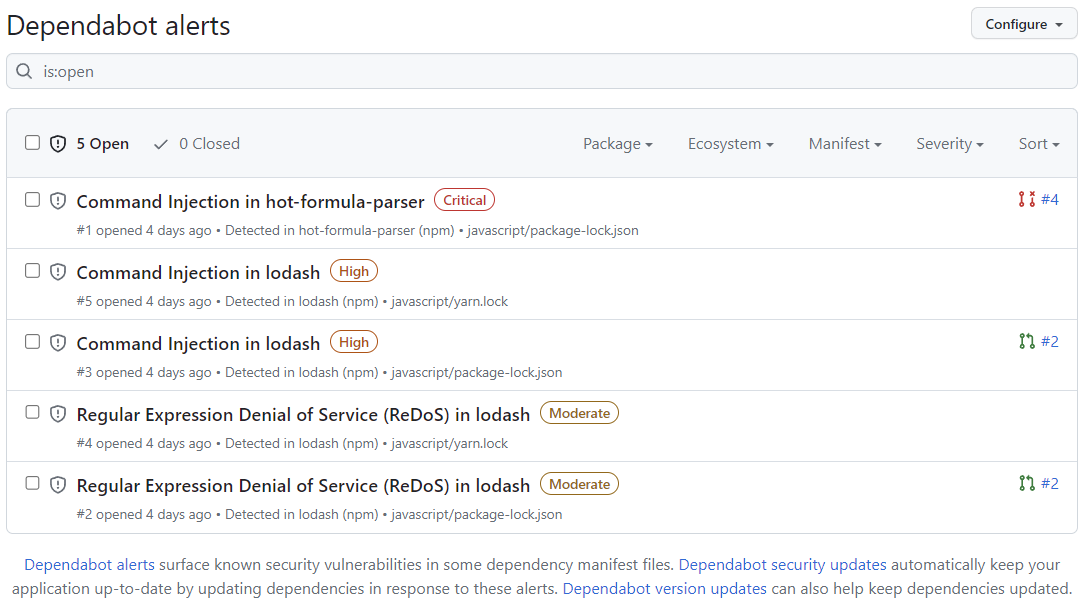
Vous pouvez filtrer Dependabot alerts dans la liste à l’aide de différents filtres ou étiquettes. Pour plus d’informations, consultez « Affichage et mise à jour des alertes Dependabot ». Vous pouvez également utiliser Règles de triage automatique de Dependabot pour filtrer les fausses alertes positives ou les alertes qui ne vous intéressent pas. Pour plus d’informations, consultez « À propos des règles de triage automatique de Dependabot ».
-
Cliquez sur l’alerte « Command Injection in lodash » dans le fichier
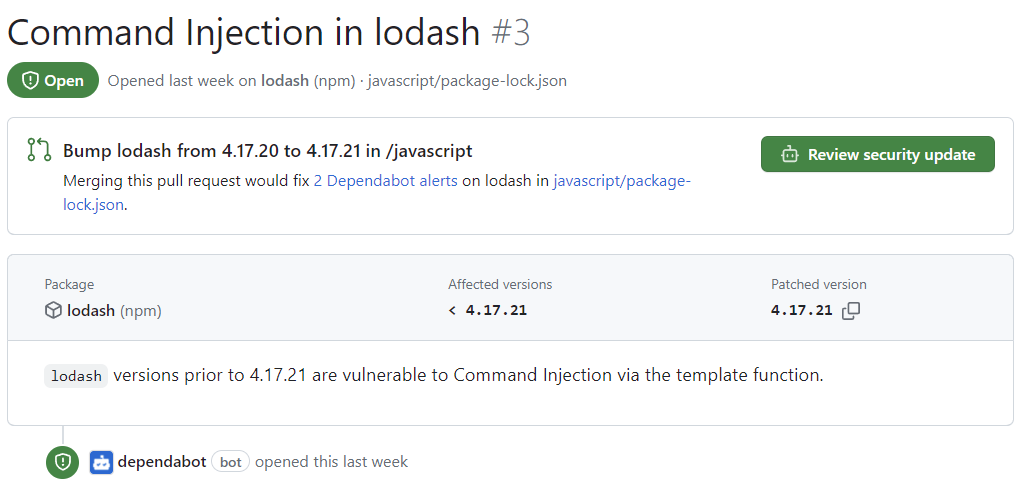
javascript/package-lock.jsonLa page de détails de l’alerte affiche les informations suivantes (notez que certaines informations peuvent ne pas s’appliquer à toutes les alertes) :- Indique si une pull request a été créée par Dependabot pour corriger la vulnérabilité. Vous pouvez passer en revue la mise à jour de sécurité suggérée en cliquant sur Vérifier la mise à jour de sécurité.
- Paquet concerné
- Versions affectées
- Version corrigée
- Brève description de la vulnérabilité
-
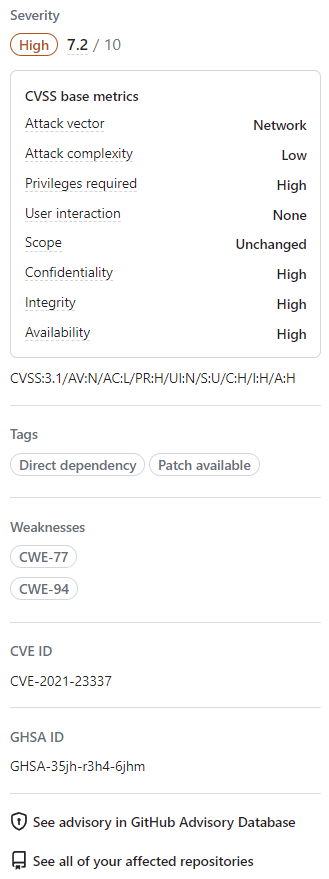
Si vous le souhaitez, vous pouvez également explorer les informations situées à droite de la page. Certaines des informations présentées dans la capture d’écran peuvent ne pas s’appliquer à chaque alerte.
- Niveau de gravité
- Métriques CVSS : nous utilisons des niveaux CVSS pour attribuer des niveaux de gravité. Pour plus d’informations, consultez « À propos de la base de données GitHub Advisory ».
- Étiquettes
- Points faibles : liste des points faibles publiquement connus liés à la vulnérabilité, le cas échéant
- IDENTIFIANT CVE : Identifiant CVE unique pour la vulnérabilité, le cas échéant
- ID GHSA : identificateur unique de l’avis correspondant sur le GitHub Advisory Database. Pour plus d’informations, consultez « À propos de la base de données GitHub Advisory ».
- Option permettant d’accéder à l’avis sur le GitHub Advisory Database
- Option permettant de voir tous vos dépôts affectés par cette vulnérabilité
- Option de suggérer des améliorations pour cet avis sur le GitHub Advisory Database


Pour plus d’informations sur l’affichage, la hiérarchisation et le Dependabot alertstri, consultez Affichage et mise à jour des alertes Dependabot.
Résolution ou abandon d’une Dependabot alerte
Vous pouvez corriger ou ignorer Dependabot alerts dans GitHub. Continuons à utiliser le dépôt dupliqué comme exemple et l’alerte « Injection de commandes dans lodash » décrite dans la section précédente.
- Accédez à l’onglet Dependabot du référentiel. Pour plus d’informations, consultez la section Affichage Dependabot alerts de votre référentiel ci-dessus.
- Cliquez sur une alerte.
- Cliquez sur l’alerte « Command Injection in lodash » dans le fichier
javascript/package-lock.json - Passez en revue l’alerte. Vous pouvez:
-
Passer en revue la mise à jour de sécurité suggérée en cliquant sur Vérifier la mise à jour de sécurité. Cela ouvrira la pull request générée par Dependabot avec le correctif de sécurité.
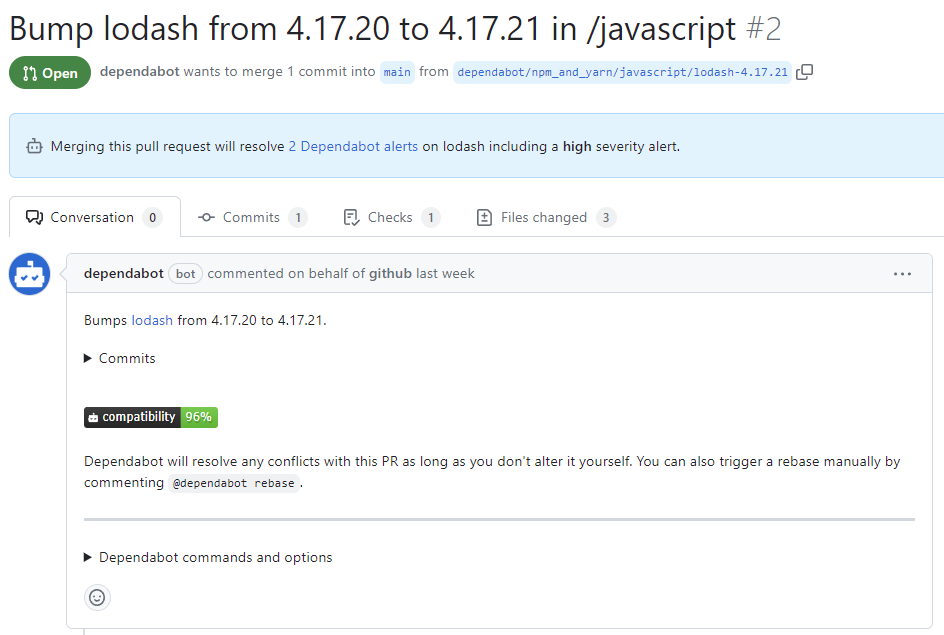
- Dans la description de la pull request, vous pouvez cliquer sur Commits pour explorer les commits inclus dans la pull request.
- Vous pouvez également cliquer sur Dependabot des commandes et des options pour découvrir les commandes que vous pouvez utiliser pour interagir avec la pull request.
- Lorsque vous êtes prêt à mettre à jour votre dépendance et à résoudre la vulnérabilité, fusionnez la pull request.
-
Si vous décidez que vous souhaitez ignorer l’alerte
-
Revenez à la page des détails de l’alerte.
-
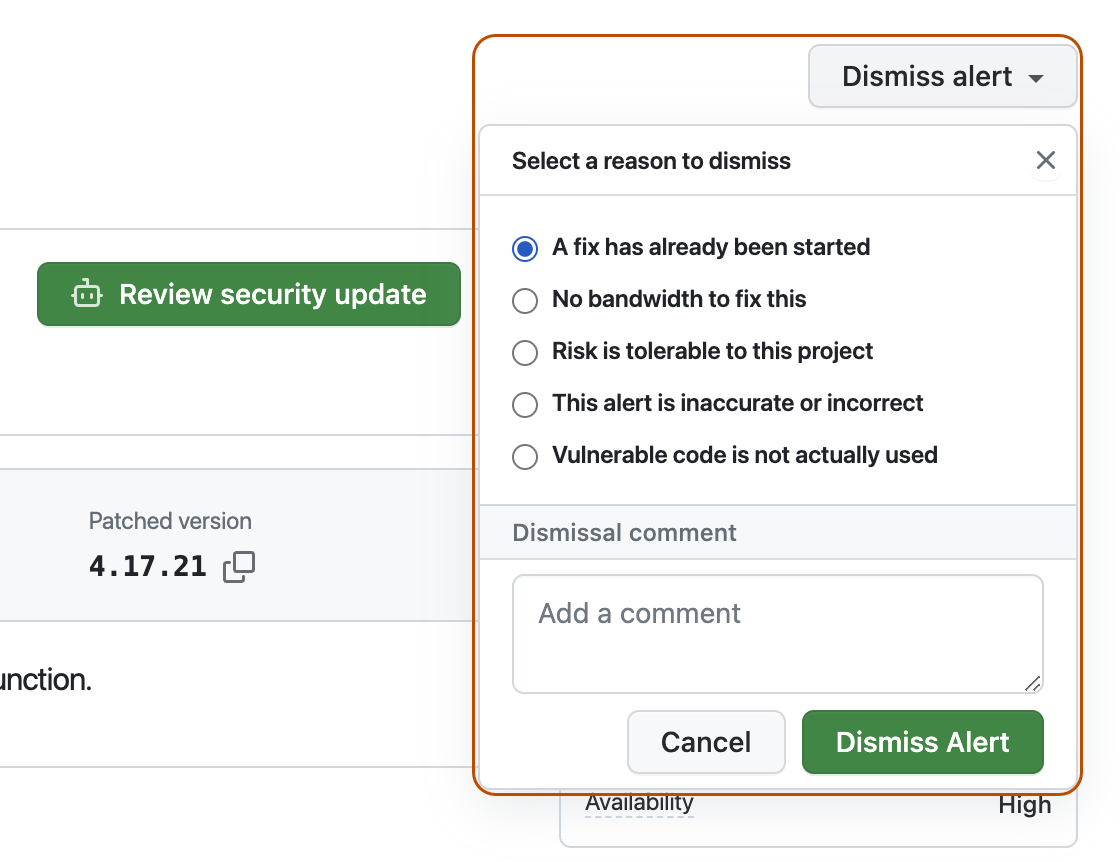
Dans le coin supérieur droit, cliquez sur Ignorer l’alerte.
-
Sélectionnez la raison pour laquelle vous souhaitez ignorer l’alerte.
-
Si vous le souhaitez, ajoutez un commentaire d'annulation. Le commentaire de l’action Ignorer est ajouté à la chronologie des alertes et peut être utilisé comme justification lors de l’audit et de la création de rapports.
-
Cliquez sur Ignorer l’alerte. L’alerte disparaît de l’onglet Ouvertes de la liste des alertes et apparaît sous l’onglet Fermées.
-
-


Pour plus d’informations sur la révision et la mise à jour Dependabot alerts, consultez Affichage et mise à jour des alertes Dependabot.
Résolution des problèmes
Vous devrez peut-être effectuer une résolution des problèmes si :
- Dependabot est bloqué pour créer une pull request pour résoudre une alerte ou
- Les informations signalées par Dependabot ce n’est pas ce que vous attendez.
Pour plus d’informations, consultez Erreurs de Dependabot et Détection des dépendances vulnérables, respectivement.
Étapes suivantes
Pour plus d’informations sur la configuration des Dependabot mises à jour, consultez Configuration des mises à jour de sécurité Dependabot et Configuration de mises à jour de version Dependabot.
Pour plus d’informations sur la configuration Dependabot d’une organisation, consultez Configuration d’alertes Dependabot.
Pour plus d’informations sur l’affichage des pull requests ouvertes par Dependabot, consultez Gestion des demandes de tirage (pull request) pour les mises à jour des dépendances.
Pour plus d’informations sur les avis de sécurité qui contribuent à Dependabot alerts, consultez Exploration des avis de sécurité dans la base de données GitHub Advisory.
Pour plus d’informations sur la configuration des notifications à propos de Dependabot alerts, consultez Configuration de notifications pour les alertes Dependabot.