Utilisation de Actions Runner Controller (ARC)
Cet article fournit des instructions étape par étape pour configurer ARC sur un cluster Kubernetes et configurer Dependabot pour qu’il s’exécute sur des exécuteurs d’actions auto-hébergés. L’article :
- Contient une vue d’ensemble de l’intégration de ARC avec Dependabot.
- Fournit des étapes détaillées d’installation et de configuration à l’aide de scripts Helm.
Qu’est-ce que l’ARC ?
Actions Runner Controller est un contrôleur Kubernetes qui gère les GitHub Actions auto-hébergés sous forme de pods Kubernetes. Il vous permet de mettre à l’échelle et d’orchestrer dynamiquement les exécuteurs en fonction de vos flux de travail, offrant ainsi une meilleure utilisation des ressources et une meilleure intégration avec les environnements Kubernetes. Consultez Actions Runner Controller.
Dependabot sur ARC
Vous pouvez exécuter Dependabot sur des exécuteurs GitHub Actions auto-hébergés managés dans un cluster Kubernetes via ARC. Cela permet la mise à l’échelle automatique, l’isolation des charges de travail et une meilleure gestion des ressources pour les tâches Dependabot, garantissant ainsi que les mises à jour des dépendances peuvent s’exécuter efficacement au sein de l’infrastructure contrôlée d’une organisation tout en s’intégrant parfaitement à GitHub Actions.
Configuration d’ARC pour Dependabot sur votre environnement local
Prerequisites
- Un cluster Kubernetes
- Pour un environnement cloud managé, vous pouvez utiliser Azure Kubernetes Service (AKS).
- Pour une configuration locale, vous pouvez utiliser minikube.
- Helm
- Gestionnaire de package pour Kubernetes.
Configuration d’ARC
-
Installez ARC. Pour plus d’informations, consultez « Prise en main du contrôleur Runner Actions ».
-
Créez un répertoire de travail pour la configuration d’ARC et créez un fichier de script d’interpréteur de commandes (par exemple,
helm_install_arc.sh) pour installer la dernière version d’ARC.Bash mkdir ARC touch helm_install_arc.sh chmod 755 helm_install_arc.shmkdir ARC touch helm_install_arc.sh chmod 755 helm_install_arc.sh -
Modifiez
helm_install_arc.shavec ce script bash pour installer ARC.Text NAMESPACE="arc-systems" helm install arc \ --namespace "${NAMESPACE}" \ --create-namespace \ oci://ghcr.io/actions/actions-runner-controller-charts/gha-runner-scale-set-controllerNAMESPACE="arc-systems" helm install arc \ --namespace "${NAMESPACE}" \ --create-namespace \ oci://ghcr.io/actions/actions-runner-controller-charts/gha-runner-scale-set-controller -
Exécutez le fichier de script
helm_install_arc.sh../helm_install_arc.sh -
Vous devez maintenant configurer l'ensemble de mise à l'échelle de l'exécuteur. Pour cela, commençons par créer et modifier un fichier avec le script bash suivant.
Bash touch arc-runner-set.sh chmod 755 arc-runner-set.sh
touch arc-runner-set.sh chmod 755 arc-runner-set.shText INSTALLATION_NAME="dependabot" NAMESPACE="arc-runners" GITHUB_CONFIG_URL=REPO_URL GITHUB_PAT=PAT helm install "${INSTALLATION_NAME}" \ --namespace "${NAMESPACE}" \ --create-namespace \ --set githubConfigUrl="${GITHUB_CONFIG_URL}" \ --set githubConfigSecret.github_token="${GITHUB_PAT}" \ --set containerMode.type="dind" \ oci://ghcr.io/actions/actions-runner-controller-charts/gha-runner-scale-setINSTALLATION_NAME="dependabot" NAMESPACE="arc-runners" GITHUB_CONFIG_URL=REPO_URL GITHUB_PAT=PAT helm install "${INSTALLATION_NAME}" \ --namespace "${NAMESPACE}" \ --create-namespace \ --set githubConfigUrl="${GITHUB_CONFIG_URL}" \ --set githubConfigSecret.github_token="${GITHUB_PAT}" \ --set containerMode.type="dind" \ oci://ghcr.io/actions/actions-runner-controller-charts/gha-runner-scale-set -
Exécutez le fichier de script
arc-runner-set.sh.Bash ./arc-runner-set.sh
./arc-runner-set.sh
Remarque
- Le nom d'installation de l'ensemble de mise à l'échelle de l'exécuteur doit être
dependabotafin de cibler la tâche dependabot sur l'exécuteur. - La configuration
containerMode.type="dind"est nécessaire pour permettre à l’exécuteur de se connecter au démon Docker. - Si un exécuteur au niveau de l’organisation ou de l’entreprise est créé, les champs d’application appropriés doivent être fournis à Personal Access Token (PAT).
- Vous pouvez créer un personal access token (classic) (PAT). Le jeton doit avoir les étendues suivantes en fonction de si vous créez un ensemble de mise à l'échelle des exécuteurs au niveau du dépôt, de l’organisation ou de l’entreprise.
- Niveau du référentiel : repo
- Niveau de l’organisation : admin:org
- Niveau de l’entreprise : admin:enterprise
Pour plus d’informations sur la création de personal access token (classic), consultez Gestion de vos jetons d’accès personnels.
Ajout de groupes d’exécuteurs
Les groupes d’exécuteurs sont utilisés pour contrôler quelles organisations ou quels dépôts ont accès aux ensembles de mise à l'échelle des exécuteurs. Pour ajouter un groupe identique d’exécuteurs à un groupe d’exécuteurs, vous devez déjà avoir un groupe d’exécuteurs.
Pour plus d’informations sur la création de groupes de runners, consultez Gestion de l’accès aux exécuteurs auto-hébergés à l’aide de groupes.
N’oubliez pas d’ajouter le paramétrage suivant à la configuration de l'ensemble de mise à l'échelle de l'exécuteur dans le Helm Chart.
--set runnerGroup="<Runner group name>" \
--set runnerGroup="<Runner group name>" \
Vérification de votre installation
-
Vérifiez votre installation.
Bash helm list -A
helm list -ASortie:
➜ ARC git:(master) ✗ helm list -A NAME NAMESPACE REVISION UPDATED STATUS CHART APP VERSION arc arc-systems 1 2025-04-11 14:41:53.70893 -0500 CDT deployed gha-runner-scale-set-controller-0.11.0 0.11.0 arc-runner-set arc-runners 1 2025-04-11 15:08:12.58119 -0500 CDT deployed gha-runner-scale-set-0.11.0 0.11.0 dependabot arc-runners 1 2025-04-16 21:53:40.080772 -0500 CDT deployed gha-runner-scale-set-0.11.0 -
Vérifiez le pod du gestionnaire à l’aide de cette commande.
Bash kubectl get pods -n arc-systems
kubectl get pods -n arc-systemsSortie:
➜  ARC git:(master) ✗ kubectl get pods -n arc-systems

NAME                                    READY   STATUS    RESTARTS      AGE
arc-gha-rs-controller-57c67d4c7-zjmw2   1/1     Running   8 (36h ago)   6d9h
arc-runner-set-754b578d-listener        1/1     Running   0             11h
dependabot-754b578d-listener            1/1     Running   0             14h
Configuration de Dependabot
-
Sur GitHub, accédez à la page principale du référentiel.
-
Sous le nom de votre référentiel, cliquez sur Paramètres. Si vous ne voyez pas l’onglet « Paramètres », sélectionnez le menu déroulant , puis cliquez sur Paramètres.

-
Dans la section « Sécurité » de la barre latérale, cliquez sur Advanced Security.
-
Sous « Dependabot », faites défiler jusqu'à « Dependabot sur les exécuteurs d'actions », puis sélectionnez Activer pour « Dependabot sur les exécuteurs auto-hébergés ».

Déclenchement d’une exécution Dependabot
Maintenant que vous avez configuré ARC, vous pouvez démarrer une exécution Dependabot.
-
Sur GitHub, accédez à la page principale du référentiel.
-
Sous le nom de votre référentiel, cliquez sur l’onglet Aperçus.
-
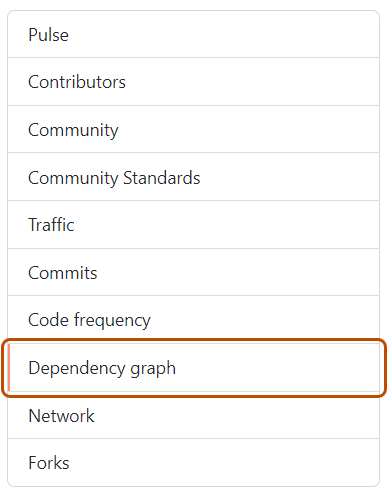
Dans la barre latérale à gauche, cliquez sur Graphe des dépendances.
-
Sous « Graphe de dépendances », cliquez sur Dependabot .
-
À droite du nom du fichier manifeste qui vous intéresse, cliquez sur Tâches de mise à jour récentes.
-
Si aucune tâche de mise à jour récente n’est disponible pour le fichier manifeste, cliquez sur Vérifier les mises à jour pour réexécuter une tâche de mise à jour de la version Dependabot et vérifier si de nouvelles mises à jour sont disponibles pour les dépendances de cet écosystème.

Affichage des lanceurs ARC générés
Vous pouvez afficher les exécuteurs ARC qui ont été créés pour la tâche Dependabot.
-
Sur GitHub, accédez à la page principale du référentiel.
-
Sous le nom de votre référentiel, cliquez sur Actions.

-
Dans la barre latérale gauche, cliquez sur Runners.
-
Sous « Exécuteurs », cliquez sur Exécuteurs auto-hébergés pour afficher la liste de tous les exécuteurs disponibles dans le référentiel. Vous pouvez voir l’exécuteur dependabot éphémère qui a été créé.


Vous pouvez également afficher le même pod d’exécuteur dependabot créé dans votre cluster Kubernetes à partir du terminal en exécutant cette commande.
➜  ARC git:(master) ✗ kubectl get pods -n arc-runners
    NAME                            READY   STATUS    RESTARTS   AGE
    dependabot-sw8zn-runner-4mbc7   2/2     Running   0          46s
➜  ARC git:(master) ✗ kubectl get pods -n arc-runners
    NAME                            READY   STATUS    RESTARTS   AGE
    dependabot-sw8zn-runner-4mbc7   2/2     Running   0          46s
De plus, vous pouvez vérifier :
-
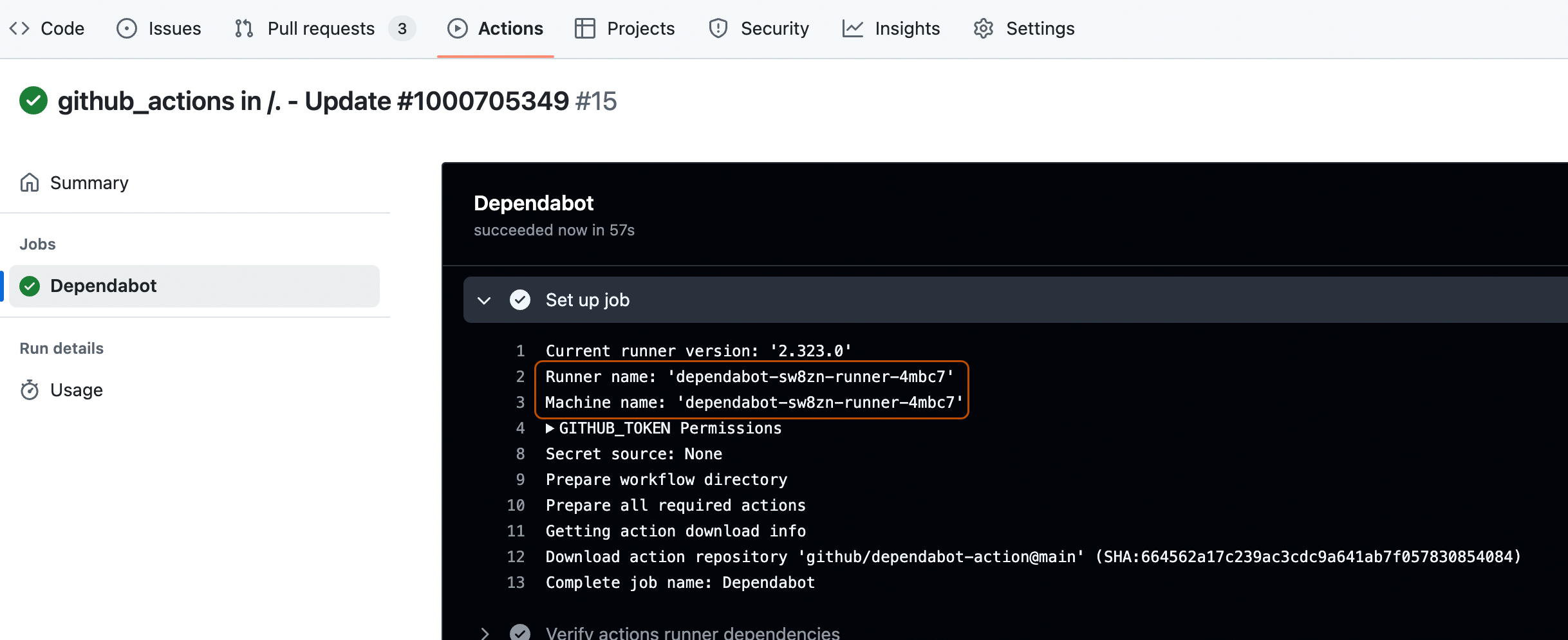
Consultez les journaux en vérifiant le nom de l'exécuteur et celui de la machine. Consultez Affichage des journaux de travaux Dependabot.
-
Les demandes de tirage de mise à jour de version créées par la tâche Dependabot dans l'onglet Demandes de tirage du dépôt.
