About Dependabot
This quickstart guide walks you through setting up and enabling Dependabot, viewing Dependabot alerts, and updating your repository to use a secure version of the dependency.
Dependabot 由三种不同的功能组成,可帮助你管理依赖项:
- Dependabot alerts:就存储库中使用的依赖项中的漏洞问题通知你。
- Dependabot security updates:自动引发拉取请求,以更新你使用的具有已知安全漏洞的依赖项。
- Dependabot version updates:自动引发拉取请求以使依赖项保持最新。
Prerequisites
For the purpose of this guide, we're going to use a demo repository to illustrate how Dependabot finds vulnerabilities in dependencies, where you can see Dependabot alerts on GitHub, and how you can explore, fix, or dismiss these alerts.
You need to start by forking the demo repository.
- Navigate to https://github.com/dependabot/demo.
- At the top of the page, on the right, click Fork.
- Select an owner (you can select your GitHub personal account) and type a repository name. For more information about forking repositories, see 为存储库创建分支.
- Click Create fork.
Enabling Dependabot for your repository
You need to follow the steps below on the repository you forked in Prerequisites.
-
在 GitHub 上,导航到存储库的主页面。
-
在仓库名称下,单击 “Settings”****。 如果看不到“设置”选项卡,请选择“”下拉菜单,然后单击“设置”。

-
在边栏的“Security”部分中,单击“ Advanced Security”****。
-
Under "Dependabot", click Enable for Dependabot alerts, Dependabot security updates, and Dependabot version updates.
-
If you clicked Enable for Dependabot version updates, you can edit the default
dependabot.ymlconfiguration file that GitHub creates for you in the/.githubdirectory of your repository. To enable Dependabot version updates for your repository, you typically configure this file to suit your needs by editing the default file, and committing your changes. You can refer to the snippet provided in 配置 Dependabot 版本更新 for an example.

注意
If the dependency graph is not already enabled for the repository, GitHub will enable it automatically when you enable Dependabot.
For more information about configuring each of these Dependabot features, see 配置 Dependabot 警报, 配置 Dependabot 安全更新, and 配置 Dependabot 版本更新.
Viewing Dependabot alerts for your repository
If Dependabot alerts are enabled for a repository, you can view Dependabot alerts on the "Security" tab for the repository. You can use the forked repository that you enabled Dependabot alerts on in the previous section.
-
在 GitHub 上,导航到存储库的主页面。
-
在仓库名称下,单击 “Security”****。 如果看不到“Security”选项卡,请选择 下拉菜单,然后单击“Security”********。

-
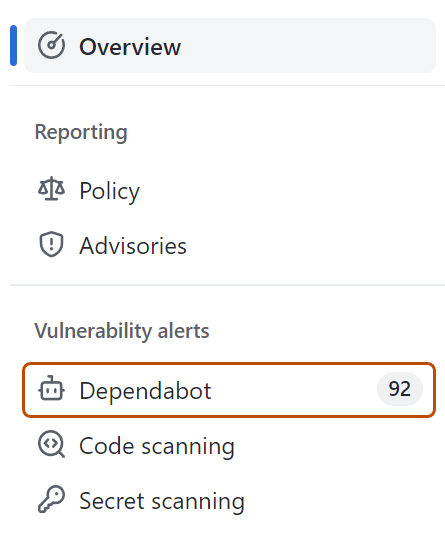
在安全概览的“漏洞警报”边栏中,单击“Dependabot”。 如果缺少此选项,则表示你无权访问安全警报,需要被授予访问权限。 有关详细信息,请参阅“管理存储库的安全和分析设置”。
-
Review the open alerts on the Dependabot alerts page. By default, the page displays the Open tab, listing the open alerts. (You'll be able to view any closed alerts by clicking Closed.)
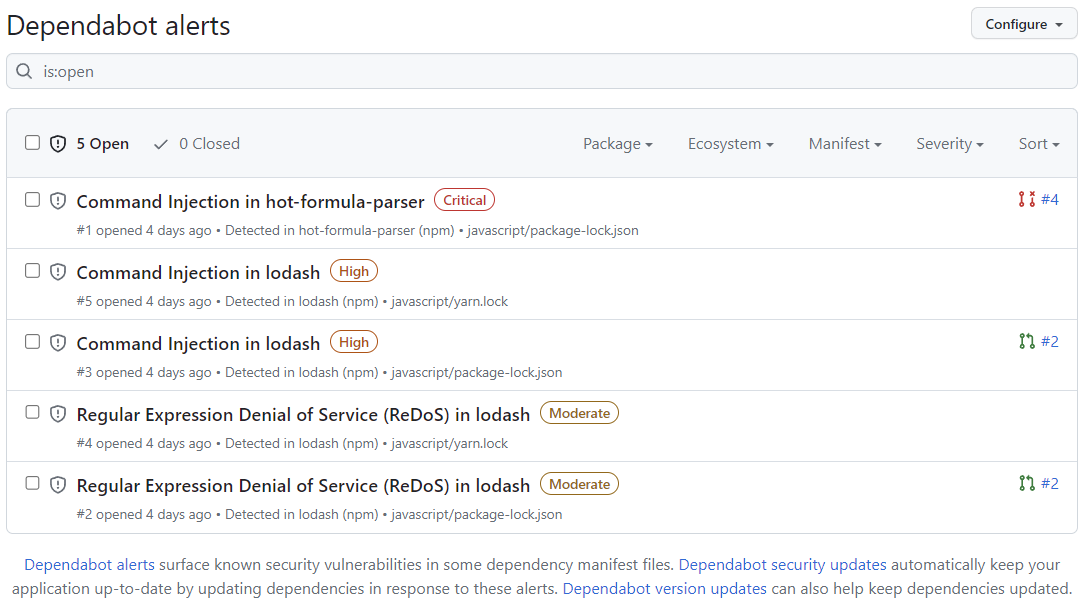
You can filter Dependabot alerts in the list, using a variety of filters or labels. For more information, see Viewing and updating Dependabot alerts. You can also use Dependabot 自动分类规则 to filter out false positive alerts or alerts you're not interested in. For more information, see 关于 Dependabot 自动分类规则.
-
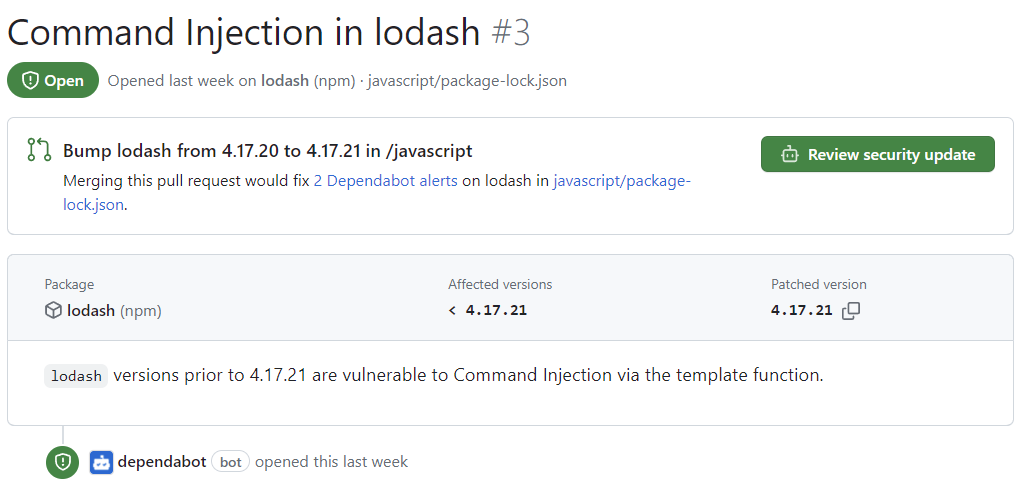
Click the "Command Injection in lodash" alert on the
javascript/package-lock.jsonfile. The details page for the alert will show the following information (note that some information may not apply to all alerts):- Whether Dependabot created a pull request that will fix the vulnerability. You can review the suggested security update by clicking Review security update.
- Package involved
- Affected versions
- Patched version
- Brief description of the vulnerability
-
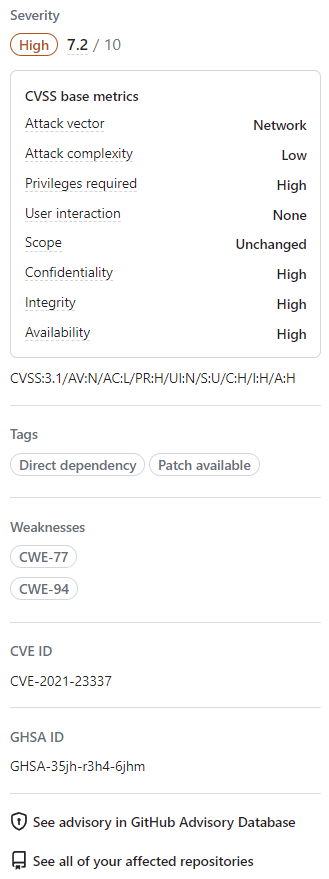
Optionally, you can also explore the information on the right-side of the page. Some of the information shown in the screenshot may not apply to every alert.
- Severity
- CVSS metrics: We use CVSS levels to assign severity levels. For more information, see 关于 GitHub 公告数据库.
- Tags
- Weaknesses: List of CWEs related to the vulnerability, if applicable
- CVE ID: Unique CVE identifier for the vulnerability, if applicable
- GHSA ID: Unique identifier of the corresponding advisory on the GitHub Advisory Database. For more information, see 关于 GitHub 公告数据库.
- Option to navigate to the advisory on the GitHub Advisory Database
- Option to see all of your repositories that are affected by this vulnerability
- Option to suggest improvements for this advisory on the GitHub Advisory Database


For more information about viewing, prioritizing, and sorting Dependabot alerts, see Viewing and updating Dependabot alerts.
Fixing or dismissing a Dependabot alert
You can fix or dismiss Dependabot alerts on GitHub. Let's continue to use the forked repository as an example, and the "Command Injection in lodash" alert described in the previous section.
- Navigate to the Dependabot alerts tab for the repository. For more information, see the Viewing Dependabot alerts for your repository section above.
- Click an alert.
- Click the "Command Injection in lodash" alert on the
javascript/package-lock.jsonfile. - Review the alert. You can:
-
Review the suggested security update by clicking Review security update. This will open the pull request generated by Dependabot with the security fix.
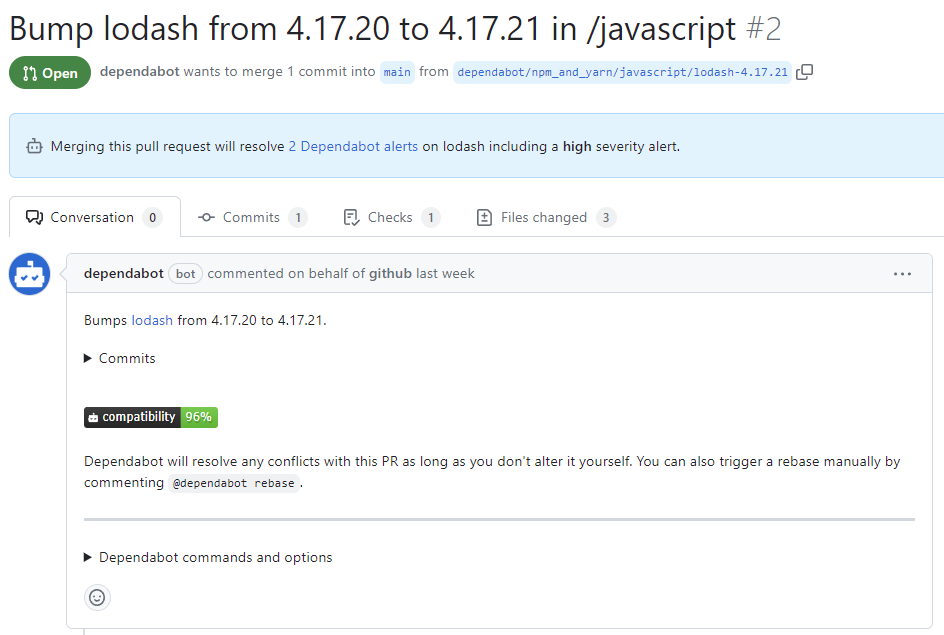
- On the pull request description, you can click Commits to explore the commits included in the pull request.
- You can also click Dependabot commands and options to learn about the commands that you can use to interact with the pull request.
- When you're ready to update your dependency and resolve the vulnerability, merge the pull request.
-
If you decide that you want to dismiss the alert
-
Go back to the alert details page.
-
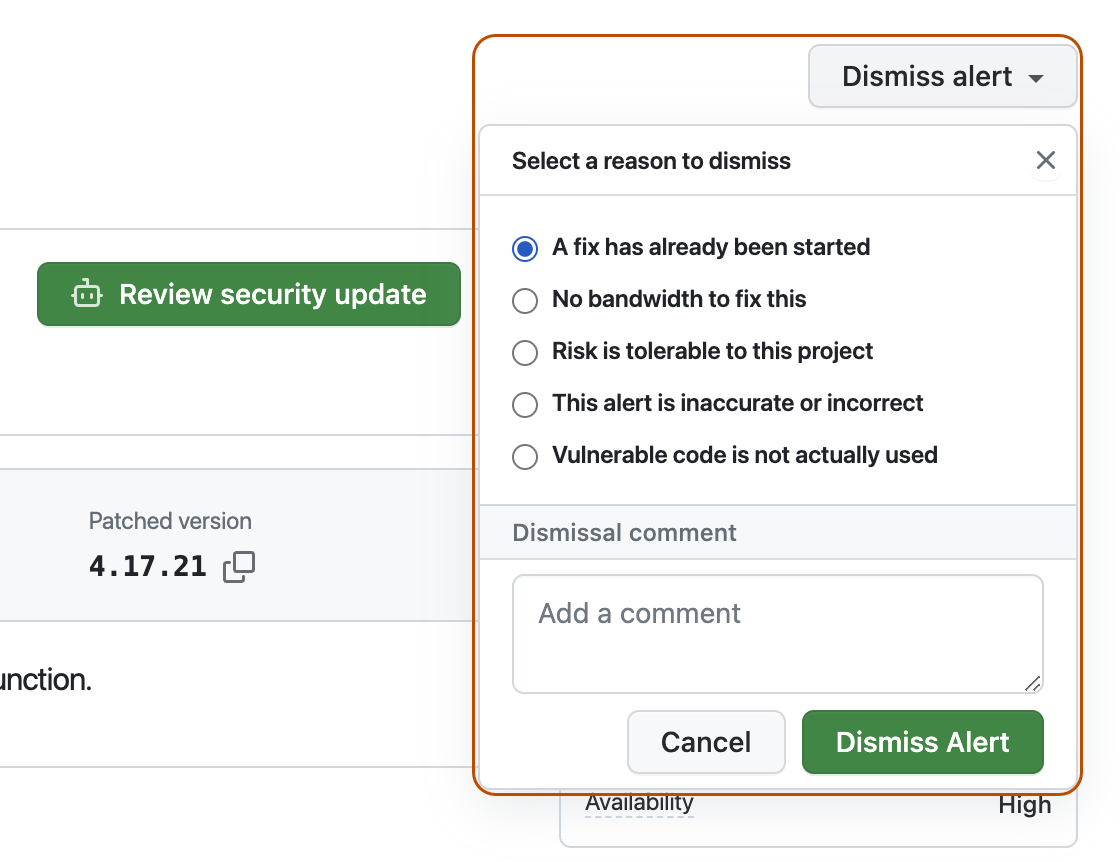
On the top-right corner, click Dismiss alert.
-
Select a reason for dismissing the alert.
-
Optionally, add a dismissal comment. The dismissal comment will be added to the alert timeline and can be used as justification during auditing and reporting.
-
Click Dismiss alert. The alert won't appear anymore in the Open tab of the alert list, and you are able to view it in the Closed tab.
-
-


For more information about reviewing and updating Dependabot alerts, see Viewing and updating Dependabot alerts.
Troubleshooting
You may need to do some troubleshooting if:
- Dependabot is blocked from creating a pull request to fix an alert, or
- The information reported by Dependabot is not what you expect.
For more information, see 排查 Dependabot 错误 and 漏洞依赖项检测疑难解答, respectively.
Next steps
For more information about configuring Dependabot updates, see 配置 Dependabot 安全更新 and 配置 Dependabot 版本更新.
For more information about configuring Dependabot for an organization, see 配置 Dependabot 警报.
For more information about viewing pull requests opened by Dependabot, see 管理依赖项更新的所有拉取请求.
For more information about the security advisories that contribute to Dependabot alerts, see 在 GitHub Advisory Database 中浏览安全公告.
For more information about configuring notifications about Dependabot alerts, see 为 Dependabot 警报配置通知.