About security policies
To give people instructions for reporting security vulnerabilities in your project, you can add a SECURITY.md file to your repository's root, docs, or .github folder. Adding this file to this part(s) of your repository automatically creates a row with a description where people can review it. When someone creates an issue in your repository, they will see a link to your project's security policy.
You can create a default security policy for your organization or personal account. For more information, see 创建默认的社区运行状况文件.
提示
To help people find your security policy, you can link to your SECURITY.md file from other places in your repository, such as your README file. For more information, see 关于仓库 README 文件.
After someone reports a security vulnerability in your project, you can use GitHub Security Advisories to disclose, fix, and publish information about the vulnerability. For more information about the process of reporting and disclosing vulnerabilities in GitHub, see 关于安全漏洞的协调披露. For more information about repository security advisories, see 关于存储库安全公告.
还可加入 GitHub Security Lab,以浏览与安全相关的主题,并为安全工具和项目做出贡献。
For an example of a real SECURITY.md file, see https://github.com/electron/electron/blob/main/SECURITY.md.
Adding a security policy to your repository
-
在 GitHub 上,导航到存储库的主页面。
-
在仓库名称下,单击 “Security”****。 如果看不到“Security”选项卡,请选择 下拉菜单,然后单击“Security”********。

-
In the left sidebar, under "Reporting", click Policy.
-
Click Start setup.
-
In the new
SECURITY.mdfile, add information about supported versions of your project and how to report a vulnerability. -
单击“提交更改...”
-
在“提交消息”字段中,输入简短、有意义的提交消息,以描述对文件的更改。 您可以在提交消息中将提交归于多个作者。 有关详细信息,请参阅“创建有多个作者的提交”。
-
如果在 GitHub 上有多个电子邮件地址与你的帐户关联,请单击电子邮件地址下拉菜单,然后选择要用作 Git 作者电子邮件地址的电子邮件地址。 只有经过验证的电子邮件地址才会出现在此下拉菜单中。 如果启用了电子邮件地址隐私,则使用无回复电子邮件地址作为默认提交作者的电子邮件地址。 有关无回复电子邮件地址可以采用的确切格式的详细信息,请参阅“设置提交电子邮件地址”。

-
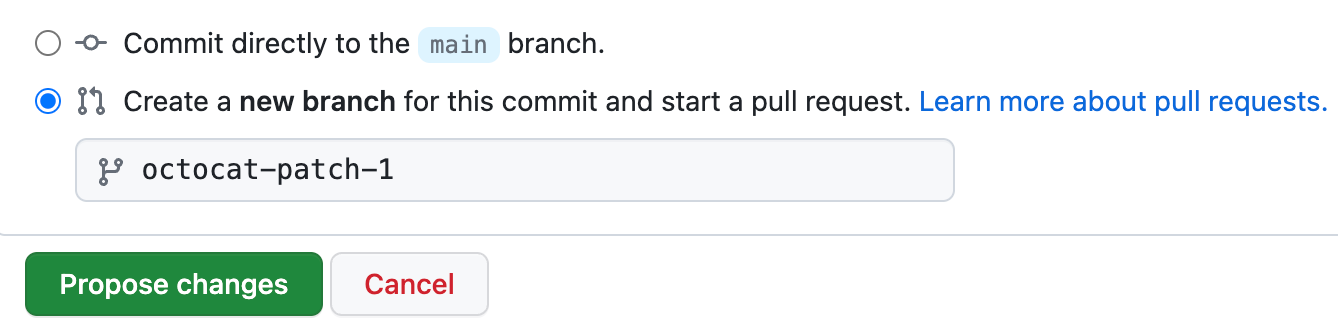
在提交消息字段下面,确定是要将提交添加到当前分支还是新分支。 如果当前分支是默认分支,则应选择为提交创建新分支,然后创建拉取请求。 有关详细信息,请参阅“创建拉取请求”。
-
单击“提交更改”或“建议更改” 。


