ARC(Actions Runner Controller) 작업
이 문서에서는 Kubernetes 클러스터에 ARC를 설정하고 Dependabot을 자체 호스팅 작업 러너에서 실행되도록 구성하는 단계별 지침을 제공합니다. 이 문서에서는 다음 내용을 다룹니다.
- ARC와 Dependabot 통합에 대한 개요를 제공합니다.
- 헬름 스크립트를 사용하여 자세한 설치 및 구성 단계를 제공합니다.
ARC란?
Actions Runner Controller는 자체 호스팅 GitHub Actions를 Kubernetes의 포드로 관리하는 컨트롤러입니다. 이 컨트롤러를 사용하면 워크플로에 따라 러너를 동적으로 확장하고 오케스트레이션하여 리소스를 더 효율적으로 활용하고 Kubernetes 환경과의 통합도 강화됩니다. Actions Runner 컨트롤러을(를) 참조하세요.
ARC의 Dependabot
ARC를 통해 Kubernetes 클러스터 내에서 관리되는 자체 호스팅 Dependabot 러너에서 GitHub Actions을 실행할 수 있습니다. 이렇게 하면 Dependabot 작업에서 자동 크기 조정, 워크로드 격리, 향상된 리소스 관리가 가능해져 GitHub Actions와 원활하게 통합되는 동시에 조직의 제어 인프라 내에서 종속성 업데이트를 효율적으로 실행할 수 있습니다.
로컬 환경에서 Dependabot을 위한 ARC 설정
필수 조건
- Kubernetes 클러스터
- 관리 클라우드 환경의 경우 AKS(Azure Kubernetes Service)를 사용할 수 있습니다.
- 로컬 설정의 경우 minikube를 사용할 수 있습니다.
- 헬름
- Kubernetes 패키지 관리자입니다.
ARC 설정
-
ARC를 설치합니다. 자세한 내용은 Actions Runner 컨트롤러로 시작하기을(를) 참조하세요.
-
ARC 설치를 위한 작업 디렉터리를 만들고 셸 스크립트 파일(예:
helm_install_arc.sh)을 만들어 최신 ARC 버전을 설치합니다.Bash mkdir ARC touch helm_install_arc.sh chmod 755 helm_install_arc.shmkdir ARC touch helm_install_arc.sh chmod 755 helm_install_arc.sh -
이 bash 스크립트로
helm_install_arc.sh를 편집하여 ARC를 설치합니다.Text NAMESPACE="arc-systems" helm install arc \ --namespace "${NAMESPACE}" \ --create-namespace \ oci://ghcr.io/actions/actions-runner-controller-charts/gha-runner-scale-set-controllerNAMESPACE="arc-systems" helm install arc \ --namespace "${NAMESPACE}" \ --create-namespace \ oci://ghcr.io/actions/actions-runner-controller-charts/gha-runner-scale-set-controller -
helm_install_arc.sh스크립트 파일을 실행합니다../helm_install_arc.sh -
이제 러너 스케일 세트를 구성해야 합니다. 이를 위해 먼저, 다음 bash 스크립트를 사용하여 파일을 만들고 편집해 보겠습니다.
Bash touch arc-runner-set.sh chmod 755 arc-runner-set.sh
touch arc-runner-set.sh chmod 755 arc-runner-set.shText INSTALLATION_NAME="dependabot" NAMESPACE="arc-runners" GITHUB_CONFIG_URL=REPO_URL GITHUB_PAT=PAT helm install "${INSTALLATION_NAME}" \ --namespace "${NAMESPACE}" \ --create-namespace \ --set githubConfigUrl="${GITHUB_CONFIG_URL}" \ --set githubConfigSecret.github_token="${GITHUB_PAT}" \ --set containerMode.type="dind" \ oci://ghcr.io/actions/actions-runner-controller-charts/gha-runner-scale-setINSTALLATION_NAME="dependabot" NAMESPACE="arc-runners" GITHUB_CONFIG_URL=REPO_URL GITHUB_PAT=PAT helm install "${INSTALLATION_NAME}" \ --namespace "${NAMESPACE}" \ --create-namespace \ --set githubConfigUrl="${GITHUB_CONFIG_URL}" \ --set githubConfigSecret.github_token="${GITHUB_PAT}" \ --set containerMode.type="dind" \ oci://ghcr.io/actions/actions-runner-controller-charts/gha-runner-scale-set -
arc-runner-set.sh스크립트 파일을 실행합니다.Bash ./arc-runner-set.sh
./arc-runner-set.sh
참고
- dependabot 작업을 러너에 대상으로 지정하려면 러너 스케일 세트의 이름이
dependabot이어야 합니다.
containerMode.type="dind" 구성은 러너가 Docker 디먼에 연결할 수 있도록 하기 위해 필요합니다.
- 조직 수준 또는 엔터프라이즈 수준 러너를 만드는 경우, 적절한 범위를 PAT(Personal Access Token)에 제공해야 합니다.
- PAT(personal access token (classic))를 만들 수 있습니다. 토큰에는 리포지토리, 조직 또는 엔터프라이즈 수준의 러너 스케일 세트를 생성하는지 여부에 따라 다음과 같은 범위가 포함되어야 합니다.
- 리포지토리 수준: repo
- 조직 수준: admin:org
- 엔터프라이즈 수준: admin:enterprise
personal access token (classic)을 만드는 방법에 대한 자세한 내용은 개인용 액세스 토큰 관리을(를) 참조하세요.
러너 그룹 추가
러너 그룹은 어떤 조직이나 리포지토리가 러너 스케일 집합에 액세스할 수 있는지를 제어하는 데 사용됩니다. 실행기 그룹에 실행기 Scale Set를 추가하려면 미리 실행기 그룹을 만들어야 합니다.
러너 그룹 만들기에 대한 자세한 내용은 그룹을 사용하여 자체 호스팅 실행기에 대한 액세스 관리을(를) 참조하세요.
Helm 차트의 러너 스케일 세트 구성에 다음 설정을 추가하는 것을 잊지 마세요.
--set runnerGroup="<Runner group name>" \
--set runnerGroup="<Runner group name>" \
설치 확인
-
설치를 확인하세요.
Bash helm list -A
helm list -A출력:
➜ ARC git:(master) ✗ helm list -A NAME NAMESPACE REVISION UPDATED STATUS CHART APP VERSION arc arc-systems 1 2025-04-11 14:41:53.70893 -0500 CDT deployed gha-runner-scale-set-controller-0.11.0 0.11.0 arc-runner-set arc-runners 1 2025-04-11 15:08:12.58119 -0500 CDT deployed gha-runner-scale-set-0.11.0 0.11.0 dependabot arc-runners 1 2025-04-16 21:53:40.080772 -0500 CDT deployed gha-runner-scale-set-0.11.0 -
이 명령어로 관리자 Pod를 확인하세요.
Bash kubectl get pods -n arc-systems
kubectl get pods -n arc-systems출력:
➜  ARC git:(master) ✗ kubectl get pods -n arc-systems

NAME                                    READY   STATUS    RESTARTS      AGE
arc-gha-rs-controller-57c67d4c7-zjmw2   1/1     Running   8 (36h ago)   6d9h
arc-runner-set-754b578d-listener        1/1     Running   0             11h
dependabot-754b578d-listener            1/1     Running   0             14h
Dependabot 설정
-
GitHub에서 리포지토리의 기본 페이지로 이동합니다.
-
리포지토리 이름 아래에서 Settings를 클릭합니다. "설정" 탭이 표시되지 않으면 드롭다운 메뉴를 선택한 다음 설정을 클릭합니다.

-
사이드바의 "Security" 섹션에서 Advanced Security 를 클릭합니다.
-
"Dependabot"에서 "Action Runners의 Dependabot"로 스크롤하고 "자체 호스팅 러너에서의 Dependabot"에 대해 Enable을 선택합니다.

Dependabot을(를) 실행하도록 트리거하기
이제 ARC를 설정했으므로 Dependabot 실행을 시작할 수 있습니다.
-
GitHub에서 리포지토리의 기본 페이지로 이동합니다.
-
리포지토리 이름 아래에서 Insights 탭을 클릭합니다.
-
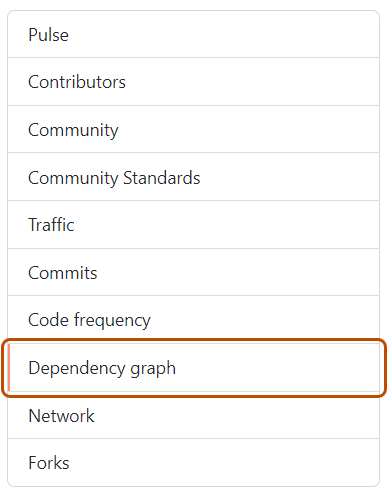
왼쪽 사이드바에서 종속성 그래프를 클릭합니다.
-
“종속성 그래프”에서 Dependabot 을 클릭합니다.
-
관심 있는 매니페스트 파일 이름 오른쪽에서 Recent update jobs를 클릭합니다.
-
매니페스트 파일에 대한 최근 업데이트 작업이 없으면 Check for updates를 클릭하여 Dependabot 버전 업데이트 작업을 다시 실행하고 해당 에코시스템의 종속성에 대한 새로운 업데이트를 확인합니다.

생성된 ARC 러너 보기
Dependabot 작업을 위해 만들어진 ARC 실행기를 볼 수 있습니다.
-
GitHub에서 리포지토리의 기본 페이지로 이동합니다.
-
리포지토리 이름에서 작업을 클릭합니다.

-
왼쪽 사이드바에서 Runners를 클릭합니다.
-
"Runners"에서 Self-hosted runners를 클릭하면 리포지토리에서 사용 가능한 모든 러너 목록을 볼 수 있습니다. 임시로 생성된 Dependabot 러너를 볼 수 있습니다.


터미널에서 다음 명령어를 실행하여 Kubernetes 클러스터 내에 생성된 동일한 Dependabot 러너 Pod를 확인할 수 있습니다.
➜  ARC git:(master) ✗ kubectl get pods -n arc-runners
    NAME                            READY   STATUS    RESTARTS   AGE
    dependabot-sw8zn-runner-4mbc7   2/2     Running   0          46s
➜  ARC git:(master) ✗ kubectl get pods -n arc-runners
    NAME                            READY   STATUS    RESTARTS   AGE
    dependabot-sw8zn-runner-4mbc7   2/2     Running   0          46s
또한 다음을 확인할 수 있습니다.
-
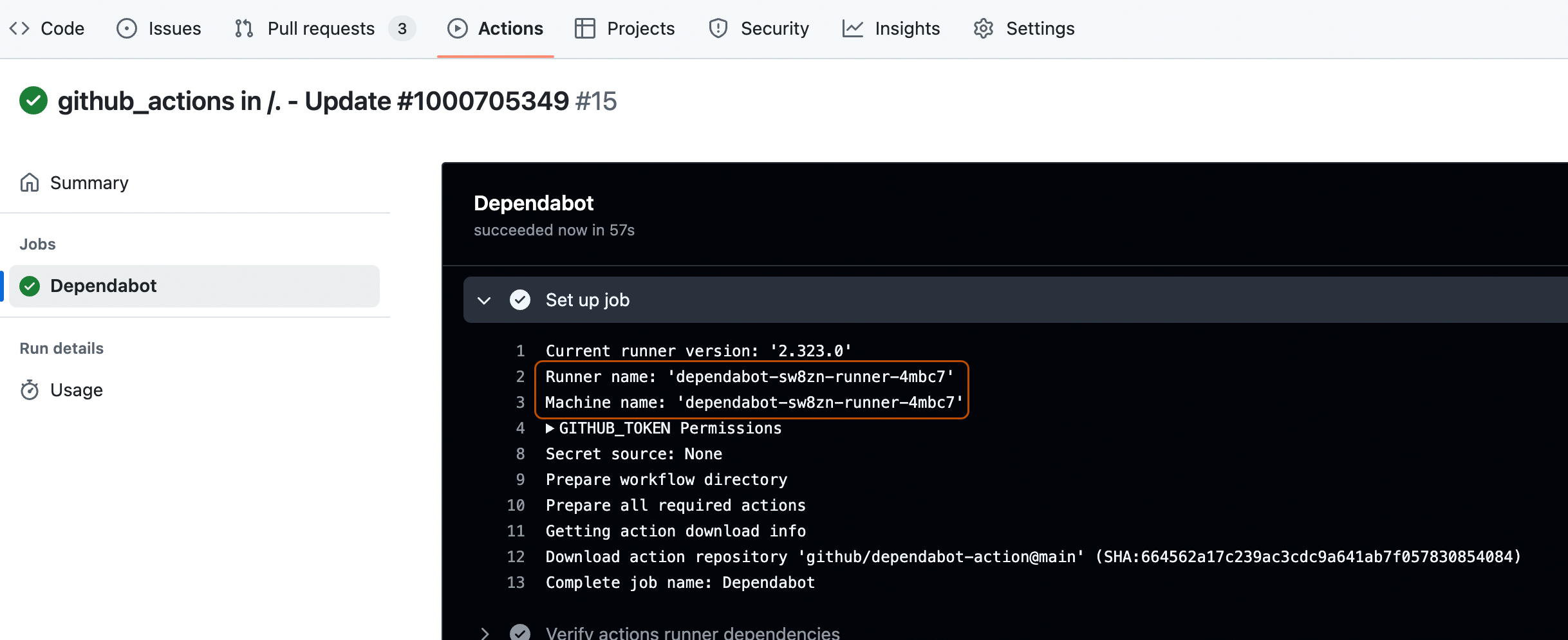
러너 및 머신 이름을 확인하여 로그를 확인합니다. Dependabot 작업 로그 보기을(를) 참조하세요.
-
Dependabot 작업에서 만든 버전 업데이트 끌어오기 요청은 해당 리포지토리의 Pull requests 탭에서 확인할 수 있습니다.
